
Introduction
Managing accounting data across multiple systems can quickly become a challenge for growing businesses. Manual data transfers between business applications and accounting software often lead to duplicate entries, missing records, reporting delays, and wasted time. The Zoho to Tally Data Integration Tool eliminates these challenges by automating data synchronization, improving accuracy, and helping finance teams work more efficiently. Whether you're managing hundreds or thousands of transactions, a reliable integration solution keeps your financial records consistent while reducing manual effort.
Why Businesses Need a Zoho to Tally Data Integration Tool
As organizations grow, financial transactions become more frequent and complex. Relying on spreadsheets or manually entering invoices into accounting software is no longer sustainable.
Common challenges include:
- Manual data entry errors
- Duplicate financial records
- Delayed accounting updates
- Increased reconciliation effort
- Reduced productivity
- Higher operational costs
A modern integration tool automates these repetitive tasks, allowing finance teams to focus on business growth rather than administrative work.
What is a Zoho to Tally Data Integration Tool?
A Zoho to Tally Data Integration Tool is designed to export accounting and inventory data from Zoho applications into Tally with minimal manual intervention.
Instead of copying information one record at a time, businesses can synchronize selected data through a structured workflow.
Typical data includes:
- Sales Invoices
- Purchase Transactions
- Journal Entries
- Customer Records
- Vendor Details
- Item Masters
- Account Masters
- Inventory Data
This ensures faster processing while maintaining data consistency.
Key Business Benefits
Faster Data Synchronization
Reduce hours of manual work by synchronizing accounting records in just a few clicks.
Improved Accuracy
Automation minimizes human errors and helps maintain reliable financial records.
Better Productivity
Finance teams spend less time entering data and more time analyzing business performance.
Flexible Data Selection
Synchronize only the required information using filters such as:
- Date
- Branch
- Organization
- Document Type
- Status
Multi-Organization Support
Manage synchronization across multiple companies or branches from a single solution.
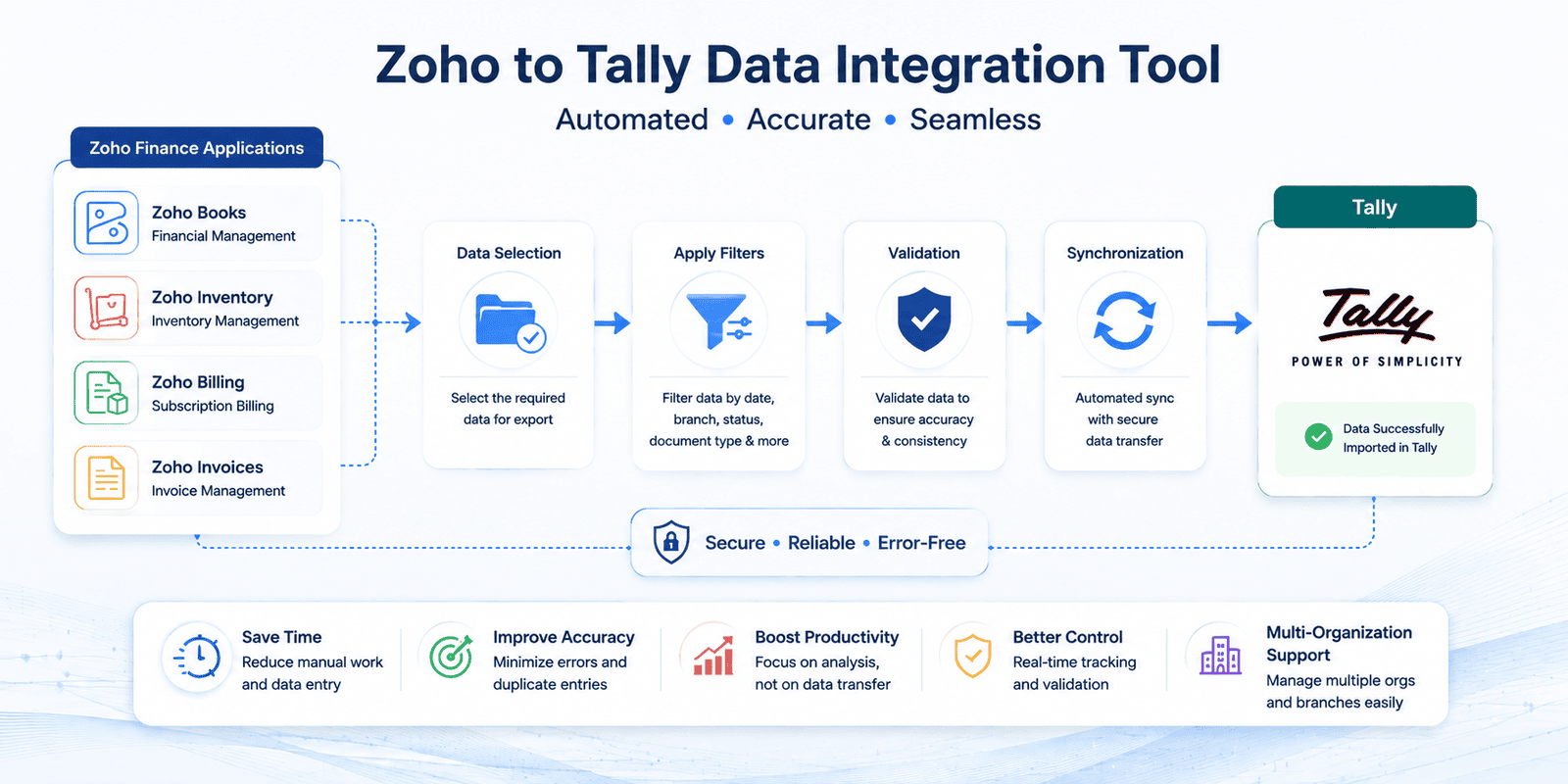
How the Integration Works
- Configure the integration.
- Select the organization.
- Choose the required data.
- Apply filters.
- Review selected records.
- Export data.
- Verify synchronization.
This simple workflow helps businesses maintain organized accounting records without repetitive manual work.
Zoho to Tally Integration: Manual vs Automated
| Manual Process | Zoho to Tally Data Integration Tool | ||
| Data Entry | Manual | Automated | ||
| Accuracy | Error-Prone | High Accuracy | ||
| Speed | Slow | Fast | ||
| Duplicate Records | Common | Minimized | ||
| Multi-Organization | Difficult | Supported | ||
| Reporting | Delayed | Faster Updates | ||
| Productivity | Lower | Higher |
Real Business Example
A wholesale distributor processes over 500 invoices every week. Previously, the finance team manually entered each invoice into Tally, consuming several hours daily and increasing the risk of duplicate records.
After implementing a Zoho to Tally Data Integration Tool, invoice synchronization became significantly faster, data accuracy improved, and the finance team could focus on financial analysis instead of repetitive data entry.
Best Practices for Successful Implementation
Common Mistakes to Avoid
- Synchronizing duplicate records
- Ignoring configuration settings
- Skipping data validation
- Not testing before full deployment
- Overlooking multi-organization settings
Avoiding these issues helps ensure reliable synchronization and cleaner financial data.
Industry Best Practices
Organizations adopting accounting automation typically experience improvements in efficiency, accuracy, and operational consistency. Industry analysts such as Gartner, IDC, and Statista continue to report increasing investment in automation and digital transformation as businesses seek scalable financial processes.
Frequently Asked Questions
The Zoho to Tally Data Integration Tool helps businesses streamline accounting synchronization by reducing manual work, improving accuracy, supporting multiple organizations, and enabling faster financial workflows. By adopting automation, organizations can enhance productivity, minimize errors, and build a more efficient finance process.
Discover how the Zoho to Tally Data Integration Tool can simplify your accounting workflow and improve operational efficiency.
Get a >>> Book a Free Demo